Hello everyone,
With Serento 1.1.6, your music comes with you in the car. Serento is now a CarPlay app, and on the car's screen it looks like Serento: the same sections, in the same order, with the same covers.
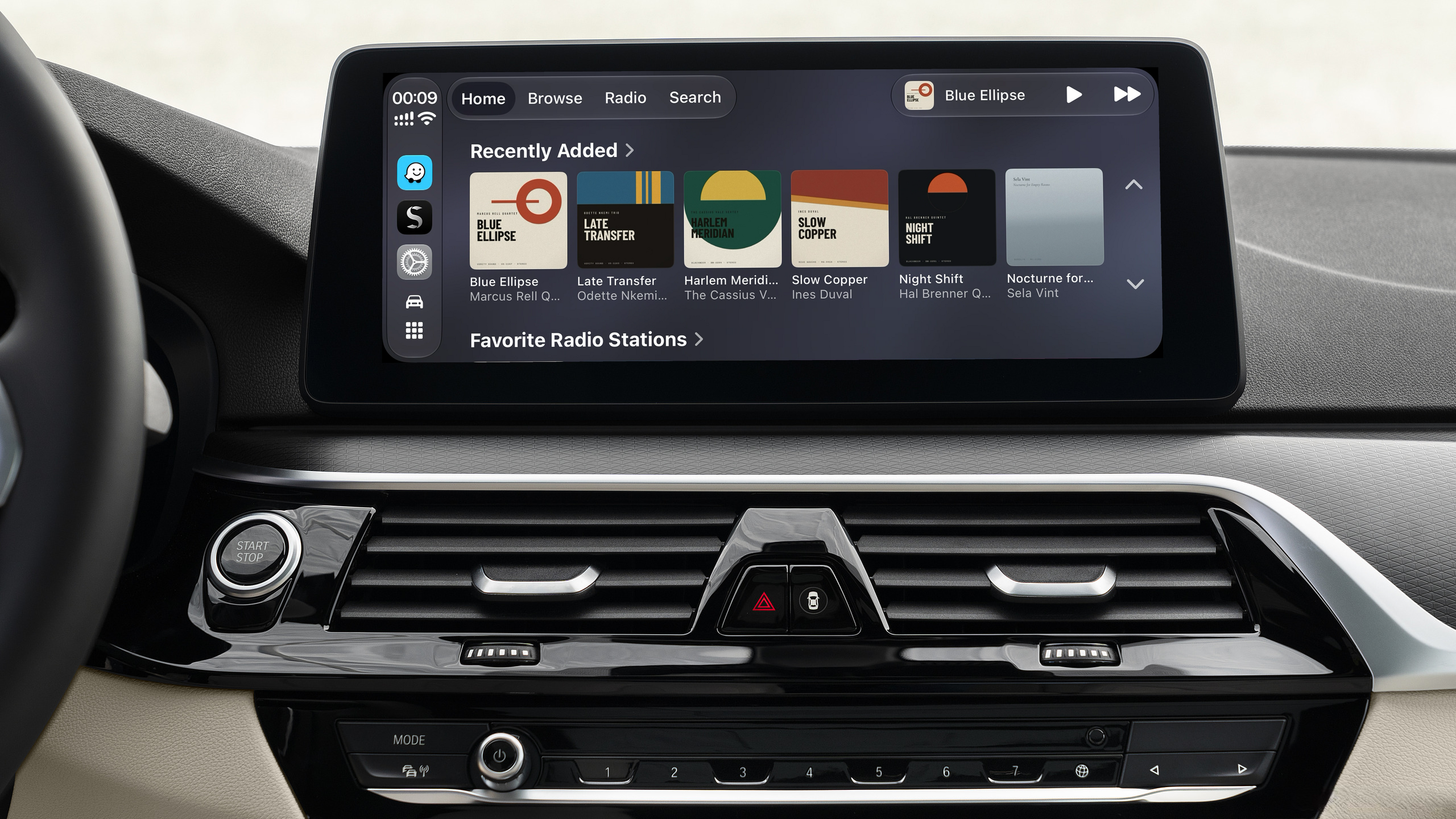
What you find in the car
Serento in the car has the tabs of the app: Home, Browse, Radio and Search.
Home is Serento's home page, made for the road: Recently Added, Favorite Albums, Favorite Radio Stations, Favorite Playlists and My Mixes, each a shelf of covers, and Recently Played at the end. The title of a shelf opens the whole list.
Browse has Albums, Artists, Tracks, Playlists and Genres. The artists are the ones Browse › Artists shows on your iPhone, with the same track artist settings. The genres are the Genres screen of your iPhone, with the same pictures: Serento's genre list, your Custom Genres, or your server's own images when Use Own Images is on.
Radio is the Radio tab of your iPhone: the genre filter at the top, then My Stations and Presets, every station with its logo, its category and its codec.
Search finds albums, artists, tracks and stations as you type, and keeps your recent searches, as on the phone. Apple opens search to audio apps from iOS 27, so with iOS 26 the car shows the first three tabs.
Every list of albums, artists, tracks or playlists starts with Play and Shuffle. An album's tracks carry their numbers, disc by disc, as on the phone.
The music on your iPhone
In the car, Serento shows the music you have downloaded to your iPhone: albums, tracks, playlists and mixes. A section appears as soon as it has something in it. On the road your server is far away, and downloaded music plays whether you have a signal or not.
Radio is different: stations are streams from the internet, so the whole catalog is there.
So before a drive, download what you want to hear. Settings › Manage › Downloads shows what is on your iPhone, and what you download while you drive appears in the car a few seconds later.
Playing
Everything you start in the car plays on your iPhone, and you hear it through the car. If your iPhone was playing on a streamer at home, Play in the car moves the music to the iPhone. Touching a track plays it and the rest of the list after it.
Now Playing is CarPlay's own screen, and the buttons on your steering wheel work as they do with any audio app. Lyrics stay on the phone: they never appear in the car. Serento Radio keeps the music going as on the phone, and away from your server it chooses from what you have downloaded.
Opening Serento on the car's screen does not stop the radio or another app that is playing: Serento takes over only when you press Play. Unplugging your iPhone pauses the music, as taking off your headphones does.
It follows your iPhone
The car shows what your iPhone shows. Turn Custom Genres or Use Own Images on or off, or change how your genres look, and the car follows in about a second, on the screen it is showing. Favorites, downloads, what you played and your stations follow the same way.
A scheduled sync does not run while your iPhone is connected to a car, and one that is running stops when you connect. It carries on where it stopped the next time it may run.
Getting started
Update Serento on your iPhone to 1.1.6 and connect it to your car: Serento is among your car's audio apps. It starts the same way whether you open it first on your iPhone or on the car's screen.